How to Make Beautiful Product Videos With AI: The Simple Human Guide
Why traditional AI video generators struggle with software interfaces, and how the new approach builds smooth, beat-synced videos using your real website without mushy artifacts.
If you have ever tried making a promotional video for a website or app using popular AI tools like Sora or Runway, you know the frustration. The letters warp and change mid-sentence, logos get distorted, buttons look blurry, and the entire screen feels like a plastic hallucination. Even worse: if you just need to change one word or a pricing number, you have to regenerate the entire video from scratch and hope for the best.
A new wave of AI tools built on Claude Opus 5.5 solves this by flipping the concept upside down. Instead of painting a video from imagination, the AI acts like a skilled designer and developer working in tandem.
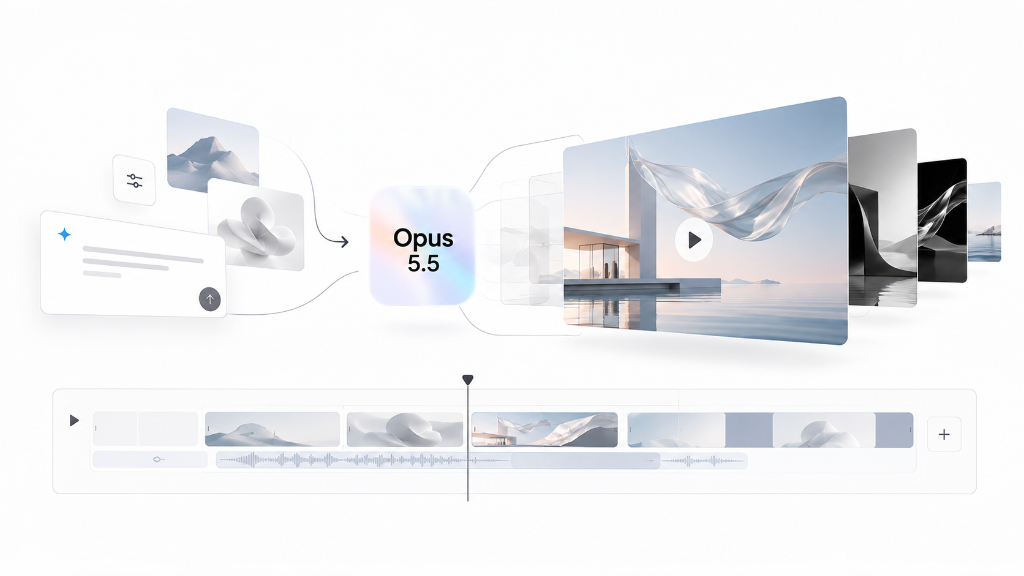
Opus 5.5 generative motion pipeline: turning real site components, vector assets and scripts into beat-synced video timelines
How This Actually Works (Without the Jargon)
•It pulls real assets from your live site: The AI opens your web page, copies your genuine vector logo in crystal clarity, downloads your official fonts, and takes clean screenshots of your interface. Everything in the video is your actual product, not an AI guess.
•Natural, spring-like motion: Instead of robotic, stiff transitions, elements move like real physical objects with soft spring physics. Cards slide in smoothly, buttons gently bounce into place, and screens transition with the polished elegance of a flagship product announcement.
•Locked to the musical beat: The video is built around rhythm. Every screen change, card pop, or zoom lands precisely on the beat of the music (120 beats per minute). Subtly synchronized clicks, swooshes, and bass accents bring the entire screen to life.
•Built-in quality inspection: The AI doesn't just render and walk away. It reviews the finished animation frame by frame, checks whether the text is readable on mobile phones, spots clunky moments, and automatically fine-tunes the animation until it looks immaculate.
4 Practical Ways You Can Use This
•Quick 15-second launch teaser: Give the AI your website URL, and ask it to assemble a high-energy teaser highlighting your main features for social media.
•Borrow the rhythm of your favorite ad: Have you seen a tech commercial whose tempo and camera angles you admire? You can tell the AI to replicate that exact cutting pace and transition style using your own website screens.
•Add a natural voiceover: Ask the AI to write a clear, conversational script and generate a realistic voice narration that explains your product while matching the visual milestones.
•Save your brand look once: Lock in your colors, typography, and animation style into a reusable preset so future videos can be created in seconds with total brand consistency.
GitHub Repositories Worth Exploring
Here are four repositories to explore for inspiration, motion principles, and code-based launch videos. They serve different purposes: a collection of examples, an agent skill, a launch-video workflow, and a complete film project.
•awesome-opus5-5-videos — my favourite: A collection of videos made with Claude Opus 5.5 and the prompts behind them. Start here to find a visual direction, study examples, and try the shared prompts.
•Motion Design Skill by LottieFiles: A skill that teaches AI agents how to choose timing, easing, choreography, and emotional intent. Useful when you want an agent to make more deliberate animation decisions across CSS, GSAP, Lottie, and other systems.
•brag: An agent skill for turning a project into a short launch video with music, motion, and accompanying share copy. Explore it when you want a workflow for presenting something you have built.
•claude-launchvideo: The source for a 33-second launch film for Tessel, a fictional calendar product. It combines Remotion visuals with a soundtrack synthesized in Python. A concrete example to study for transitions, pacing, and synchronized sound.
Check each repository's README for its own setup, requirements, and license before using it in your project.
Download the Ready-to-Use Kit
All the animation engine files, style presets, sound generators, and instructions are packaged into a single archive:
Motion Reel Kit (motion-reel-kit.zip)
ZIP Archive • 2.1 MB • Full Engine, Presets & Instructions